

 Tweet
Tweet
 **Digital Cameras**
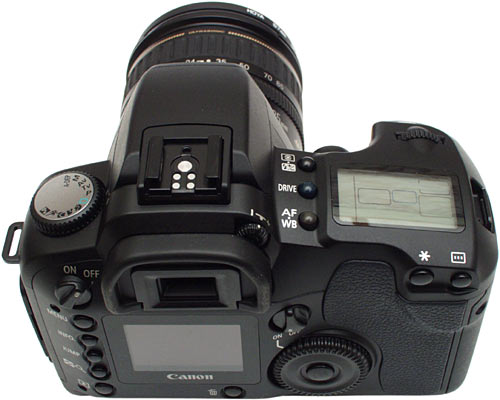
The digital camera is one of the most remarkable instances of this shift because it is so truly different from its predecessor. Conventional Cameras depend entirely on chemical and mechanical processes -- you don't even need electricity to operate them. On the other hand, all digital cameras have a built-in computer, and all of them record images electronically.
The new approach has been enormously successful. Since film still provides better picture quality, digital cameras have not completely replaced conventional cameras. But, as digital imaging technology has improved, digital cameras have rapidly become more popular.
In this article, we'll find out exactly what's going on inside these amazing digital-age devices.
Understanding the Basics
Let's say you want to take a picture and e-mail it to a friend. To do this, you need the image to be represented in the language that computers recognize -- bits and bytes . Essentially, a digital image is just a long string of 1s and 0s that represent all the tiny colored dots -- or pixels -- that collectively make up the image. (For information on sampling and digital representations of data, see this explanation of the digitization of sound waves. Digitizing light waves works in a similar way.) If you want to get a picture into this form, you have two options:
In the next few sections, we'll find out exactly how the camera does all this.
Cool Facts
A Filmless Camera

A CMOS image sensor
Instead of film, a digital camera has a sensor that converts light into electrical charges.
The image sensor employed by most digital cameras is a charge coupled device (CCD). Some cameras use complementary metal oxide semiconductor (CMOS) technology instead. Both CCD and CMOS image sensors convert light into electrons. A simplified way to think about these sensors is to think of a 2-D array of thousands or millions of tiny solar cells.
Once the sensor converts the light into electrons, it reads the value (accumulated charge) of each cell in the image. This is where the differences between the two main sensor types kick in:

A CCD sensor
Resolution
The amount of detail that the camera can capture is called the resolution, and it is measured in pixels. The more pixels a camera has, the more detail it can capture and the larger pictures can be without becoming blurry or "grainy."
Some typical resolutions include:
The size of an image taken at different resolutions
High-end consumer cameras can capture over 12 million pixels. Some professional cameras support over 16 million pixels, or 20 million pixels for large-format cameras. For comparison, Hewlett Packard estimates that the quality of 35mm film is about 20 million pixels.
How Many Pixels?
You may have noticed that the number of pixels and the maximum resolution don't quite compute. For example, a 2.1-megapixel camera can produce images with a resolution of 1600x1200, or 1,920,000 pixels. But "2.1 megapixel" means there should be at least 2,100,000 pixels. This isn't an error from rounding off or binary mathematical trickery. There is a real discrepancy between these numbers because the CCD has to include circuitry for the ADC to measure the charge. This circuitry is dyed black so that it doesn't absorb light and distort the image.
The new approach has been enormously successful. Since film still provides better picture quality, digital cameras have not completely replaced conventional cameras. But, as digital imaging technology has improved, digital cameras have rapidly become more popular.
In this article, we'll find out exactly what's going on inside these amazing digital-age devices.
Understanding the Basics
Let's say you want to take a picture and e-mail it to a friend. To do this, you need the image to be represented in the language that computers recognize -- bits and bytes . Essentially, a digital image is just a long string of 1s and 0s that represent all the tiny colored dots -- or pixels -- that collectively make up the image. (For information on sampling and digital representations of data, see this explanation of the digitization of sound waves. Digitizing light waves works in a similar way.) If you want to get a picture into this form, you have two options:
- You can take a photograph using a conventional film camera, process the film chemically, print it onto photographic paper and then use a digital scanner to sample the print (record the pattern of light as a series of pixel values).
- You can directly sample the original light that bounces off your subject, immediately breaking that light pattern down into a series of pixel values -- in other words, you can use a digital camera.
In the next few sections, we'll find out exactly how the camera does all this.
Cool Facts
- With a 3-megapixel camera, you can take a higher-resolution picture than most computer monitors can display.
- You can use your Web browser to view digital pictures taken using the JPEG format.
- The first consumer-oriented digital cameras were sold by Kodak and Apple in 1994.
- In 1998, Sony inadvertently sold more than 700,000 camcorders with a limited ability to see through clothes.
A Filmless Camera
A CMOS image sensor
Instead of film, a digital camera has a sensor that converts light into electrical charges.
The image sensor employed by most digital cameras is a charge coupled device (CCD). Some cameras use complementary metal oxide semiconductor (CMOS) technology instead. Both CCD and CMOS image sensors convert light into electrons. A simplified way to think about these sensors is to think of a 2-D array of thousands or millions of tiny solar cells.
Once the sensor converts the light into electrons, it reads the value (accumulated charge) of each cell in the image. This is where the differences between the two main sensor types kick in:
- A CCD transports the charge across the chip and reads it at one corner of the array. An analog-to-digital converter (ADC) then turns each pixel's value into a digital value by measuring the amount of charge at each photosite and converting that measurement to binary form.
- CMOS devices use several transistors at each pixel to amplify and move the charge using more traditional wires. The CMOS signal is digital, so it needs no ADC.
A CCD sensor
- CCD sensors create high-quality, low-noise images. CMOS sensors are generally more susceptible to noise.
- Because each pixel on a CMOS sensor has several transistors located next to it, the light sensitivity of a CMOS chip is lower. Many of the photons hit the transistors instead of the photodiode.
- CMOS sensors traditionally consume little power. CCDs, on the other hand, use a process that consumes lots of power. CCDs consume as much as 100 times more power than an equivalent CMOS sensor.
- CCD sensors have been mass produced for a longer period of time, so they are more mature. They tend to have higher quality pixels, and more of them.
Resolution
The amount of detail that the camera can capture is called the resolution, and it is measured in pixels. The more pixels a camera has, the more detail it can capture and the larger pictures can be without becoming blurry or "grainy."
Some typical resolutions include:
- 256x256 - Found on very cheap cameras, this resolution is so low that the picture quality is almost always unacceptable. This is 65,000 total pixels.
- 640x480 - This is the low end on most "real" cameras. This resolution is ideal for e-mailing pictures or posting pictures on a Web site.
- 1216x912 - This is a "megapixel" image size -- 1,109,000 total pixels -- good for printing pictures.
- 1600x1200 - With almost 2 million total pixels, this is "high resolution." You can print a 4x5 inch print taken at this resolution with the same quality that you would get from a photo lab.
- 2240x1680 - Found on 4 megapixel cameras -- the current standard -- this allows even larger printed photos, with good quality for prints up to 16x20 inches.
- 4064x2704 - A top-of-the-line digital camera with 11.1 megapixels takes pictures at this resolution. At this setting, you can create 13.5x9 inch prints with no loss of picture quality.
The size of an image taken at different resolutions
High-end consumer cameras can capture over 12 million pixels. Some professional cameras support over 16 million pixels, or 20 million pixels for large-format cameras. For comparison, Hewlett Packard estimates that the quality of 35mm film is about 20 million pixels.
How Many Pixels?
You may have noticed that the number of pixels and the maximum resolution don't quite compute. For example, a 2.1-megapixel camera can produce images with a resolution of 1600x1200, or 1,920,000 pixels. But "2.1 megapixel" means there should be at least 2,100,000 pixels. This isn't an error from rounding off or binary mathematical trickery. There is a real discrepancy between these numbers because the CCD has to include circuitry for the ADC to measure the charge. This circuitry is dyed black so that it doesn't absorb light and distort the image.



 vali 5500 dollar hasteshaaa
  , baz ham baram mikhari??




Comment